
This section of the Competition administration tools allows the Superusers to configure and organize a specific set of match roles (fields) on the match screen for each sport available in COMET. Sport is defined by both disciplines and gender, which allows you to have a different configuration for, i.e., Men’s Futsal vs Women’s Futsal.
For any of those combinations, you can configure the list of team-specific match roles (i.e., the persons who sit in the technical area of each team) separately from the list of persons appointed as match officials.
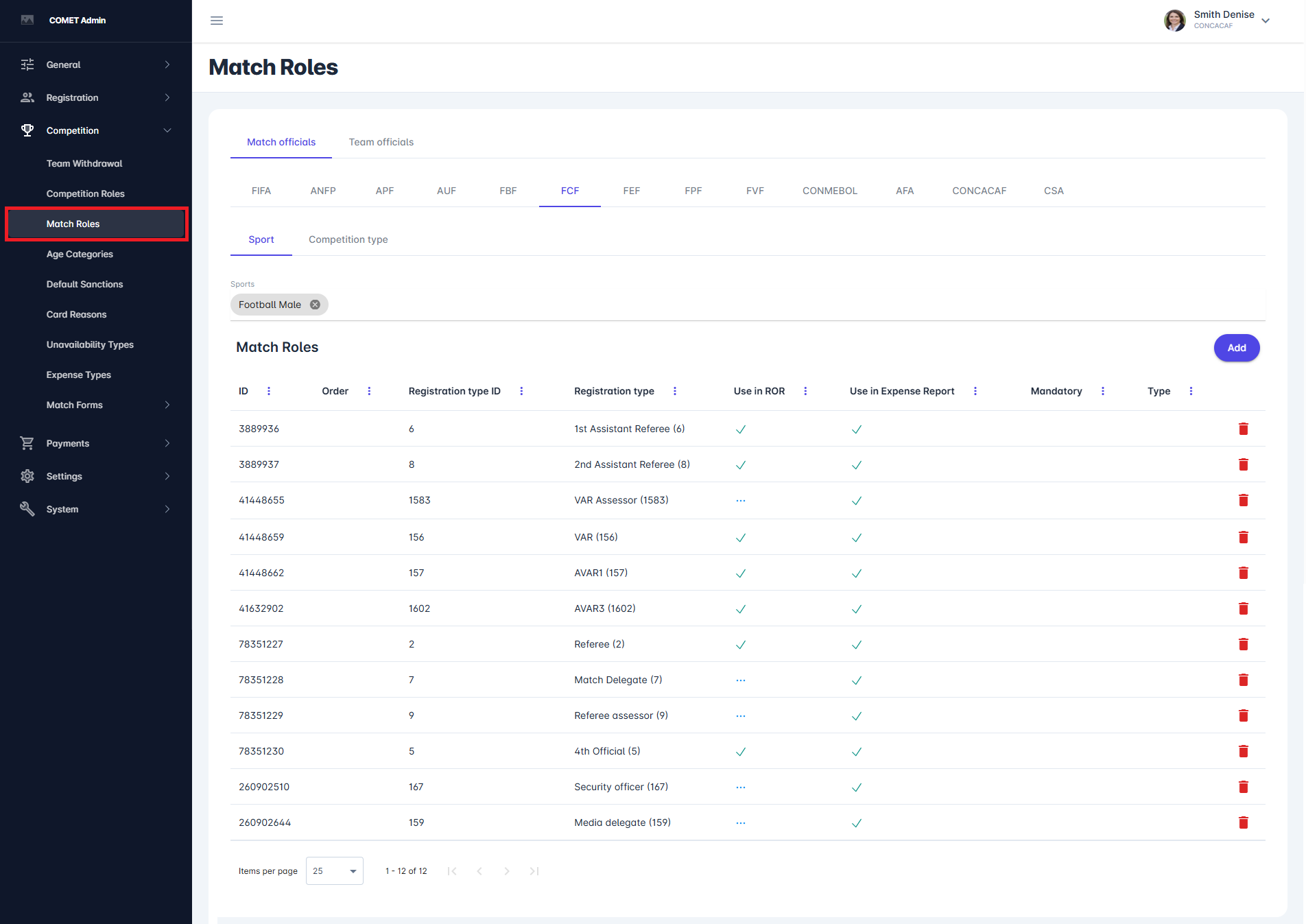
When you first click on the Match Roles menu item, you will see the list of match officials for a default sport. The table view shows key information, such as ID, Order number, Registration type ID, Registration type, Use in ROR, and Type, and it allows you to search, filter, and sort the available roles.
New Match Role
To add more roles to the list and to the match screen, for all matches in the same sport, you can click the Add button in the top right corner of the table.
By clicking on the Add button, a new dialog appears with the list of all required (and optional) values necessary to complete the configuration of each match role. The same dialog is opened when editing an existing match role configuration, as shown in the image below. Take extra care when selecting the registration type(s) and a user role, as this is very important for Match officials who may be responsible for performing specific activities during each match.
Values appearing under the Match role tab of the role configuration are:
-
ID → automatically generated
-
Match role → numerical identifier, used internally by the system
-
Order → defines the display order of the role in the list
-
Tenant → specifies the organization (association) to which this configuration belongs in multitenant environments
-
Role → defines the main category of the role
-
Sports → defines for which sports the role can be used
-
Registration type → defines the type of registered person who can be assigned to this role
-
Mandatory → It is possible to specify that some roles are mandatory, i.e., that the lineup cannot be submitted with a match role (e.g., Head Coach) left unassigned. Choose between None, Yes (role is mandatory), or Conditional (at least one role from the group should be assigned)
-
Catalogues list of values → defines the catalogue values associated with this role
-
Registration types list of values → further restricts which registration types can be assigned to this role
-
User role → defines the system user role in COMET that will be associated with a person assigned to this match role
-
Assessment viewers → defines which user roles are allowed to view assessments related to this match role
-
Assessment editors → defines which user roles are allowed to edit assessments related to this match role (e.g. Referee Observer enters assessments for Referees)
-
Use in Expense Report → if enabled, this role is included in expense reports
-
Match Manager → Grants permissions for editing lineups (when not fully secured), editing live match (e.g. Live status change, add/remove match events, match phases, etc), and confirming the match.
-
Events Editor → Grants permissions for editing live match (e.g. Live status change, add/remove match events, add/remove match phases, etc).
-
Lineups Editor → Grants permissions for editing lineups.
-
Share contacts on match → If enabled, the contacts of this match role will be visible on match to club users.
-
Private → Appointed officials in that role will be hidden from public components such as COMET LIVE Mobile Apps and COMET LIVE API. Furthermore, appointed Private Match Roles in COMET will only be visible to match stakeholders, including admins, other appointed officials, and clubs participating in the match. They will not be shown to other COMET users who are not related to the match.
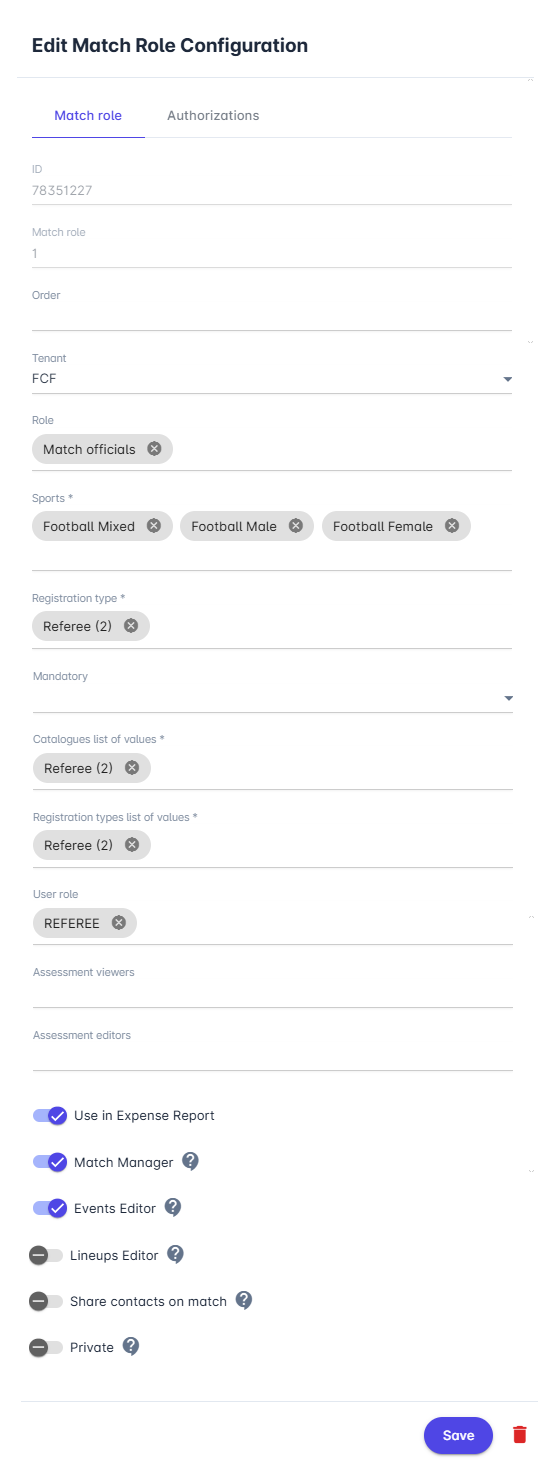
Please note that the same configuration can be easily applied to multiple sports by listing multiple values in the Sports section.
Match Roles by Competition Type
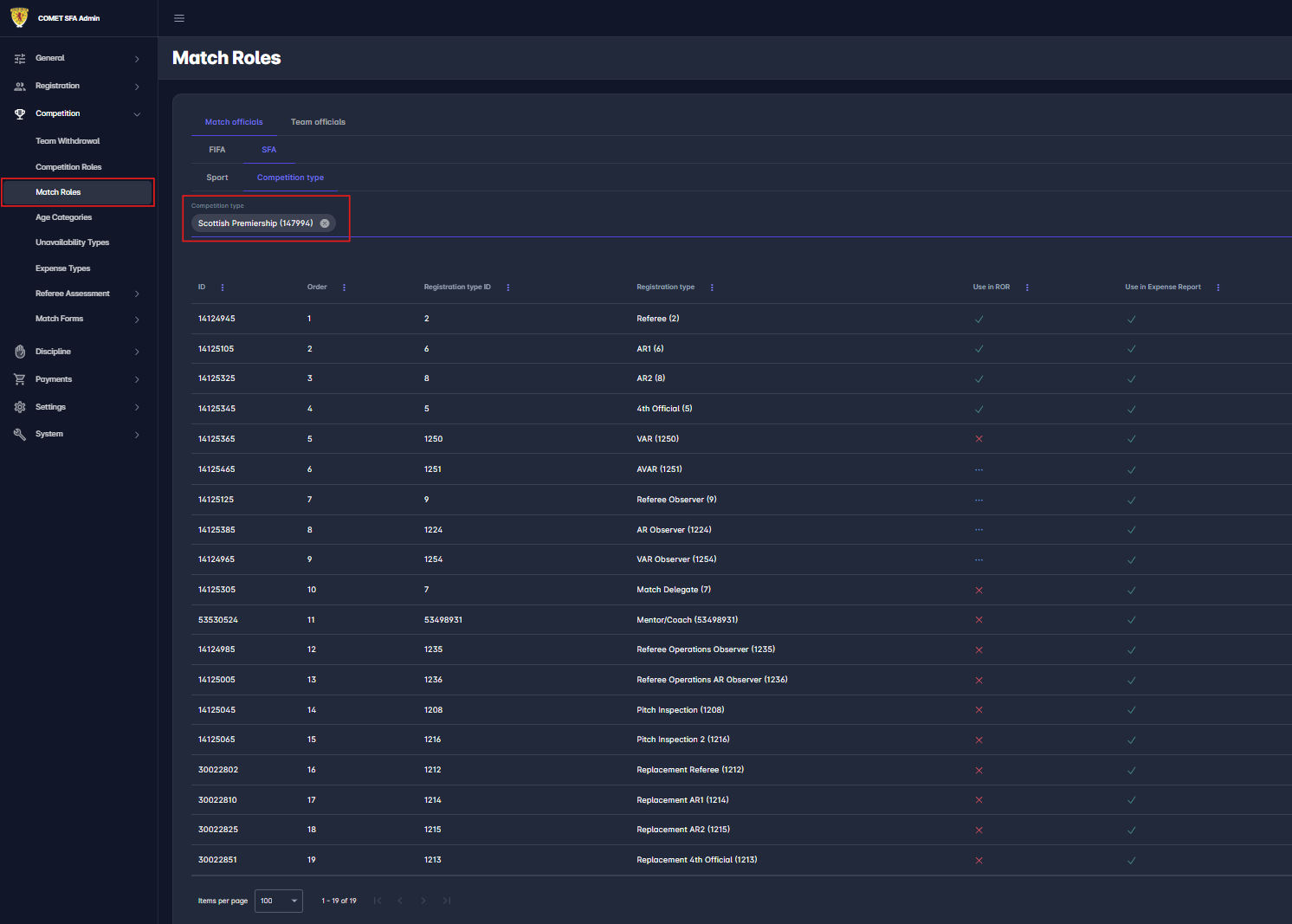
In addition to configuring match roles by Sport, you can configure them by Competition Type. On the Match Roles screen, switch from the Sport tab to the Competition Type tab, then select the relevant competition type to define its own set of match roles for either Match Officials or Team Officials.
This is not an additive configuration - it is an override. If at least one match role is defined for a competition type, only those roles will be available on matches under that competition type, and the Sport/Generic configuration is ignored completely. If no roles are defined at the competition-type level, matches under that competition type fall back to the Sport/Generic configuration.
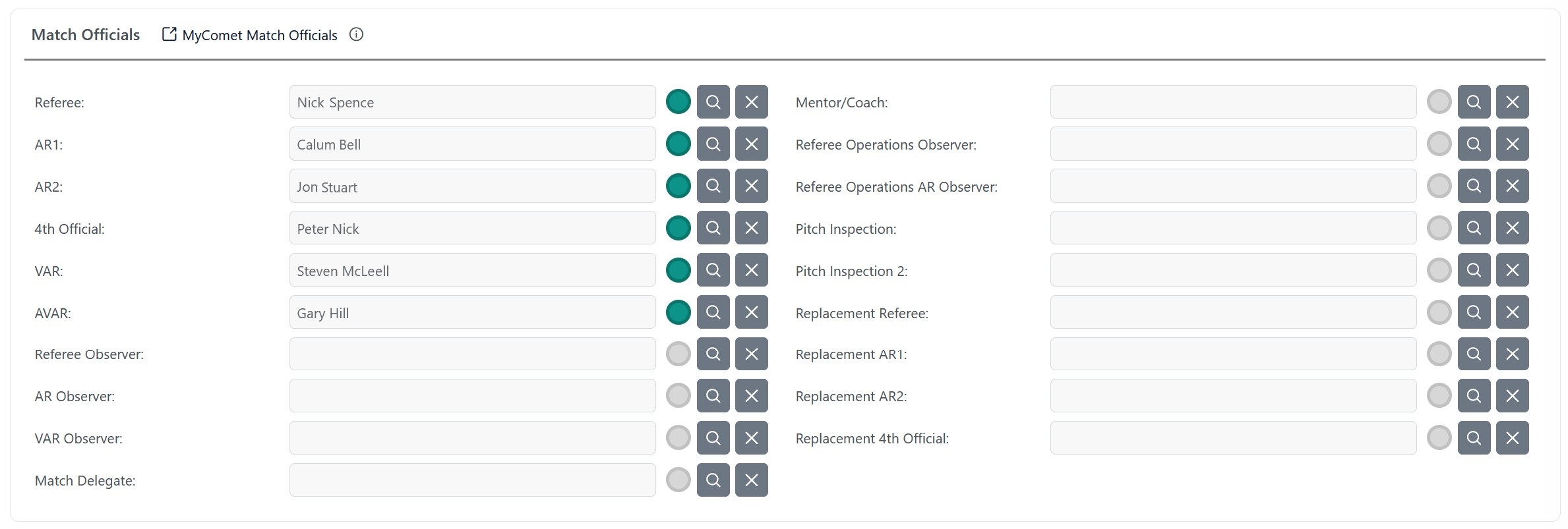
Example: the competition type Scottish Premiership has 19 match roles defined at the competition-type level for Match Officials. As a result, every match under this competition type shows exactly these 19 fields on the Match Officials screen, regardless of what is configured at the Sport level.
Match Role Authorizations
Below is the description of match-related authorizations for match officials whose appointment is confirmed on a specific Match.
The Match Manager, Events Editor, and Lineups Editor roles are those match roles with this respective option checked. Most commonly, the Match Manager is the Referee, and the Events Editor is the Venue Data Coordinator, or a similar match official role.
|
Action |
Match Manager |
Events Editor |
Lineups Editor |
Match Official |
|---|---|---|---|---|
|
Participate |
✅ |
✅ |
✅ |
✅ |
|
Edit Lineups |
✅ |
|
✅ |
|
|
Edit Events |
✅ |
✅ |
|
|
|
Confirm |
✅ |
|
|
|
|
Edit Schedule |
Conditional |
|
|
|
Important: Match Officials (including Lineups Editors and Match Managers) can only edit lineups and events when the match is in SCHEDULED or RETURNED status. In any other status (e.g., ENTERED, PLAYED), these permissions are not active — lineups cannot be entered or modified by clubs or match officials.
Participate - applies to all appointed Match Officials
-
access match details
-
confirm/reject appointments
-
complete match forms (where role appointed as editor)
-
access Lineups, Start List, and Match Report once lineups have been confirmed
The following authorizations apply to matches in status SCHEDULED and RETURNED
-
Edit Lineups
-
enter/update confirmed team lineups
-
-
Edit Events - in match status SCHEDULED and RETURNED
-
enter match events
-
carry out Live match functions (live status, start/end phase)
-
enter Live Match Commentaries
-
edit match data: Attendance, Notes
-
-
Confirm
-
Complete the Match Report → Set match to status PLAYED or ABANDONED
-
-
Edit Schedule - if Competition Type Attribute Match Manager Updates Schedule switched on.
-
edit match data: Facility, Pitch, Start Datetime, Match Number
-
Admin Authorizations
The authorizations tab in a “Match role” configuration specifies which role group is permitted to appoint and administer the official in that match role.
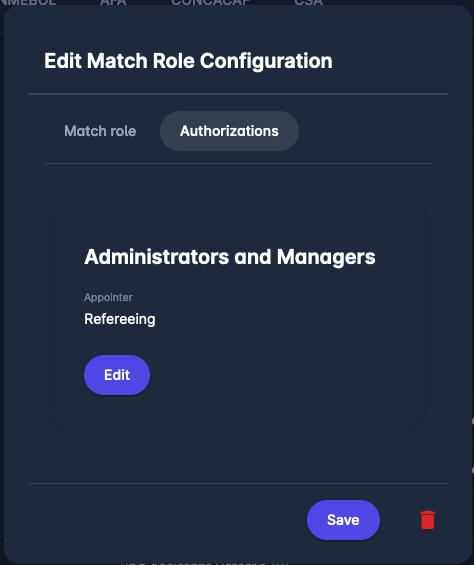
Two groups are available:
-
Refereeing → which grants permission to:
-
Administrator of Referees if the match is under the user’s organization
-
Referee Manager (also known as Referee Appointer) if the user’s connected person is added as the Referee Manager/Appointer to the (parental) competition of the match
-
-
Competition → which grants permission to:
-
Competition Administrator if the match is under the user’s organization
-
Competition Manager if the user’s connected person is added as the Competition Manager to the (parental) competition of the match
-
It’s possible to select both groups for a single Match Role configuration and to grant permissions to both departments, refereeing, and competition.
The same selection of the “Match Role” Authorizations grants permission to cancel or revert the appointment of a match official. This setting is also reflected in various processes, such as:
-
e-mail notifications,
-
unavailability administration,
-
matchday operations
For example, the Competition Administrator:
-
will be able to enter unavailability, appointment responses, and matchday actions on behalf of those Match Roles for which the “Competition” authorization setting has been set.
-
will receive response (confirm/reject) notifications only for those Match Roles for which the “Competition” authorization setting was entered.
Furthermore, administrators can correct data on behalf of their match officials after the match has been set to PLAYED. No Match Official can edit the match after it has been officialized.