
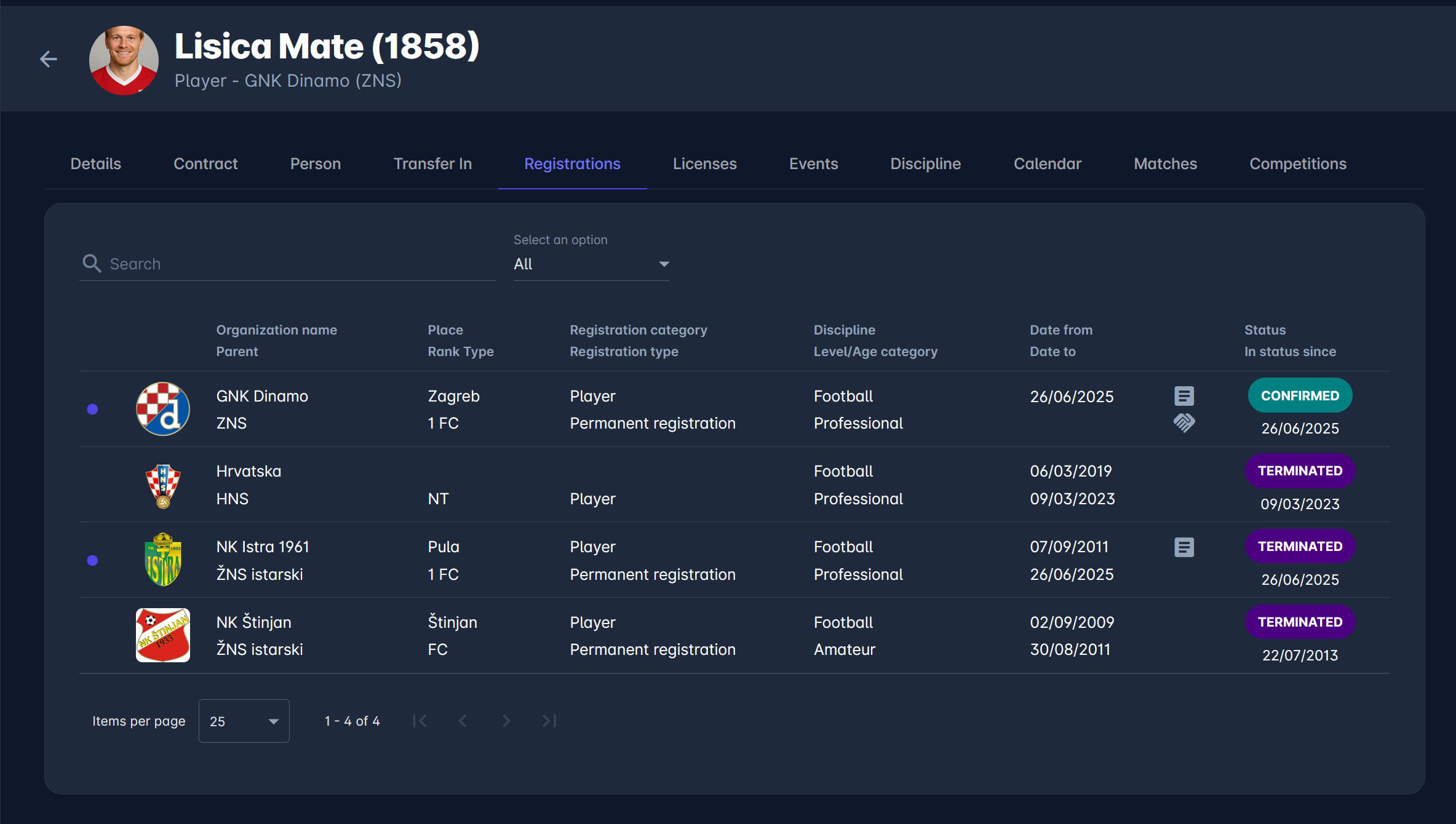
The Registrations tab within a person's profile in COMET provides a complete historical overview of all registrations associated with that person, regardless of role, organization, discipline, or status. This screen is primarily used to track a person's eligibility, historical affiliations, and registration workflow states.
Above the registration list, the following tools are available:
-
Search field – allows filtering registrations by organization name
-
Status filter dropdown (e.g. All) – enables filtering by registration status
The central part of the screen displays a table listing all registrations associated with the person. Each row represents one registration record.
The table includes the following columns:
-
Organization name / Parent organization
The club, association, or organization under which the registration was created. -
Place / Rank Type
Geographical or organizational classification (e.g., county, city, association, club). -
Registration category / Registration type
The role and type of registration, such as Player, Coach, Official, and other, i.e. Event Manager. -
Discipline / Level or Age category
The sport and competition level (e.g. Football – Professional, Football – Amateur). -
Date from / Date to
The validity period of the registration. -
Status / In status since
The current workflow status of the registration, displayed with color-coded labels, for example, Entered, Submitted, Confirmed, Approved, Rejected (INT)…The date indicates when the registration entered its current status.
Contract and Transfer Indicators
Each registration row may display up to two small icons in a narrow column immediately to the left of the Status column, providing quick access to contract and transfer information without opening the record.
Contract icon (document icon) - Indicates that a contract is linked to this registration. Hovering over the icon shows the contract type and whether it is currently active or inactive - for example, Employment contract or Employment contract (Inactive).
Transfer icon (handshake icon) - Indicates that transfer details are attached to this registration. Hovering over the icon displays Transfer Agreement.
If neither a contract nor transfer details are linked to a registration, no icons appear, and the column takes up no space.
Same indicators are displayed on the Registration Approvals Console and My Club Area.