
When you enter the Penalty shootout event, you have to:
-
Select one of the possible events from the pop-up list: goal, save, or miss.
-
For the "Penalty shootout" event to be visible, you must first add the "Penalty shootout" match phase.
-
Only players on the field at the end of regular play are eligible to participate in the shootout. The system applies the same rule.
-
Only for those players can you enter the "Penalty shootout" event.
-
After entering this event, you no longer have to insert the minute, but the number of the penalty.
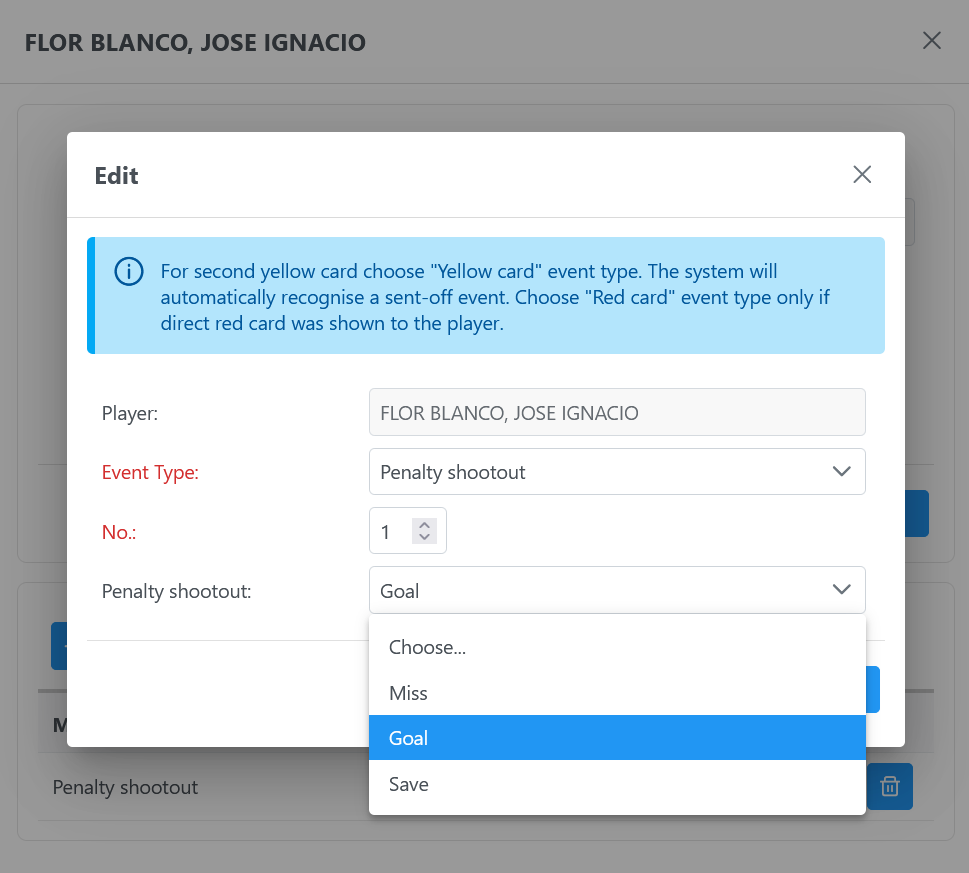
This event can be added to any defined Competition System (round-robin, elimination, etc.); therefore, make sure to add the " Match Phase 'Penalty Shootout” in the match for such a match event to be available for selection.
Once the penalty shootout is completed, the final result is displayed on the match form.

In the list of results per phase, all phases except Penalty Shootout show a cumulative value from the beginning of the match, while the Penalty Shootout phase is treated differently. Penalty Shootout phase results are showing ONLY the goals scored during this final segment of the match.
For users who enter only the results for each phase and do not enter match events, it is essential to know how to format the data correctly. For those who keep track of each kick and enter match events for each penalty scored, missed, or saved, there are no changes.