
Survey Templates Groups are designed as thematic units which are used to logically group and organize questions in your surveys and templates.
Created questions can be used in Survey Templates; templates are grouped forms of questionsthat are stored in the system and reused on different surveys.
-
Select 💠 Template Groups under the t 💲Sales →Item Surveys menu on the left nav-bar
-
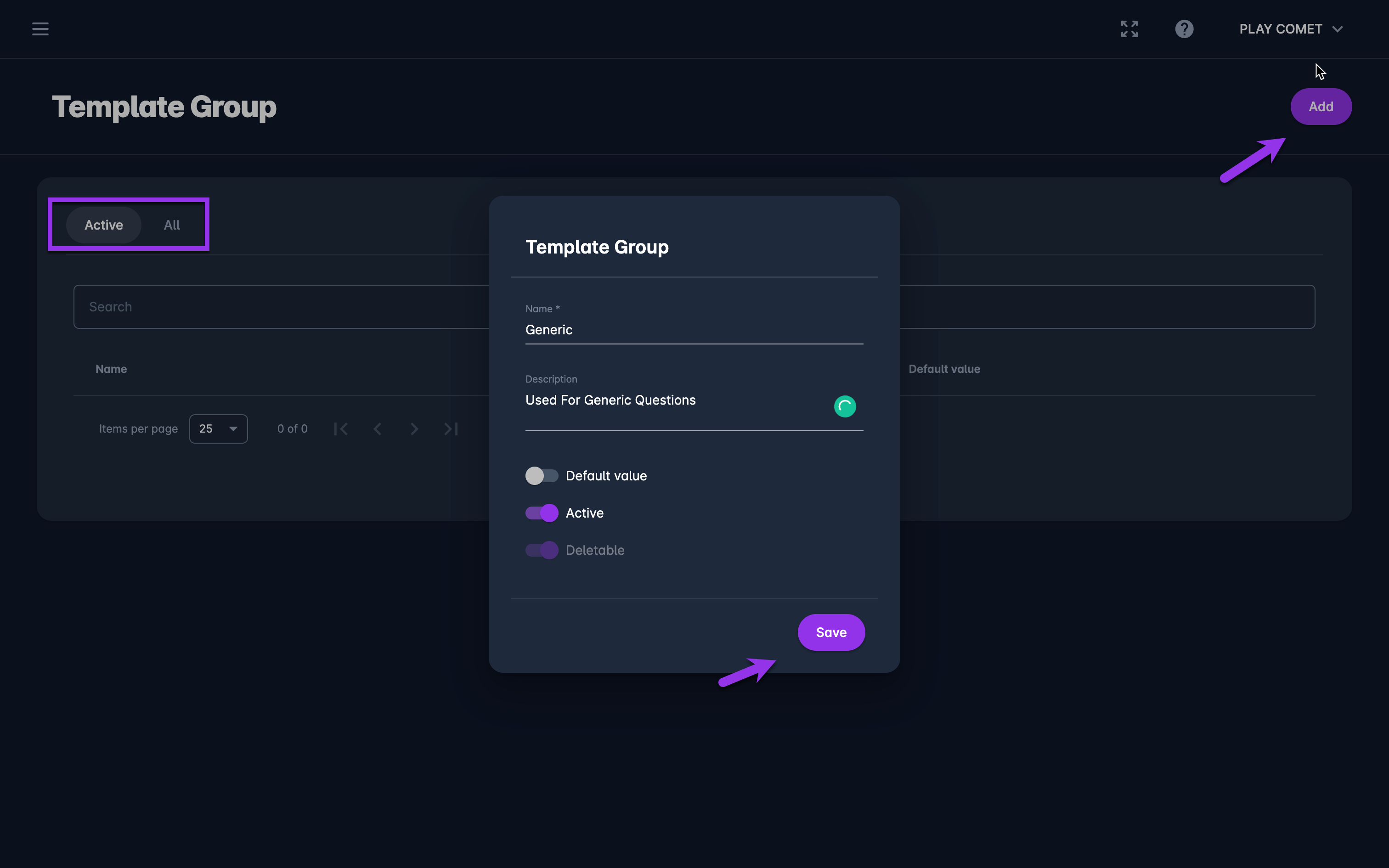
The list of all created Templates Groups is displayed with two tabs Active*/ All, the list consists of the following details:
-
Name
-
Description
-
Default value status
-
The search box (use the search box to search the item survey groups that are entered in the system)
-
Create a new Group:
-
Click on the ➕ Add button in the top right corner to create a Group
-
This opens a Template Group dialog to fill in the details:
-
Name
-
Description
-
Switch on buttons:
-
Default value - if this feature is turned on, this value will be prefilled in the group filed on Items and Item Survey Templates Dialog Form
-
Active /Inactive - *only groups that are set as active can be used on an item; inactive groups are just displayed on the All tab
-
Deletable - the groups that are set as non-deletable cannot be deleted by COMET Play users
-
-
-
Once you have entered all the data press 💾 the Save button
Created item survey groups are stored in the system and:
-
can be assigned toItems
-
can be (re)used for Item Survey Templates