
Created competitions are visible to Administrators and Managers in the Competitions list in MyCOMET.
-
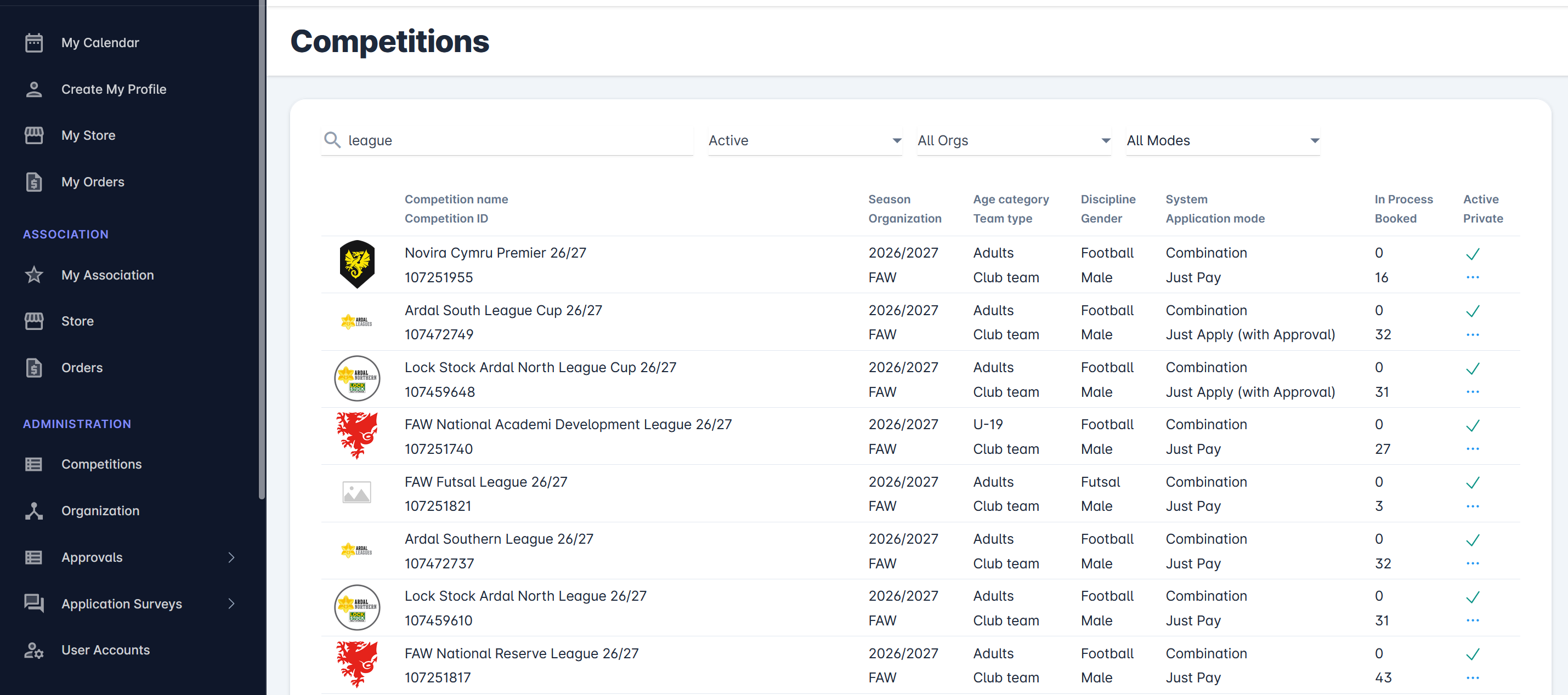
Select 📑 Competitions under the Administration menu on the left nav-bar
-
The list of all Competitions is displayed including the following filters:
-
Active - only competitions that are set as active are listed: inactive competitions are
displayed on the Inactive and on All tab. Only competitions that are set as active can be managed and modified
-
Organization filter
-
Application mode - choose between the available Competition Application Modes
-
-
The list consists of the following details:
-
Competition name and Competition ID
-
Season and Organization
-
Age Category and Team Type
-
Discipline and Gender
-
System and Application Type
-
In process (an indicator of clubs whose application is not yet confirmed) and
-
Booked (an indicator of clubs that have reserved their spot in the competition)
-
The search box (use the search box to search the list of competitions in the system)
-
In Process Status Column
On the competition list, you can see the number of clubs whose submissions for the competition are still in process. The “In Process” column displays the number of clubs that have submitted the application. Still, depending on the competition's application type, their status does not imply that they have been confirmed for the competition (e.g., ‘Returned' or 'Submitted' or 'Waiting’).
Booked Column
On the competition list, you can see the number of clubs whose applications have been approved or confirmed, i.e., they have booked their place. The “Booked” column displays the number of clubs whose place is secured in the competition. Depending on the competition's application type, the status indicates that they have been accepted (i.e., their status is Approved or Confirmed).
Click on any row will take you to Competition Detail